Hello Team,
Working Devops Support Engineer having 8.2 years of experience in Unix, Shell Scripting, SQL. Since one year i started my journey as a DevOps support engineer where i am involved in Deployments, Infrastructure monitoring using AWS- cloud-watch, Automating simple task using shell scripts.
What is a Script?
The Shell script consists of a group of commands that have to be executed repeatedly and should be kept in a file and executed as a shell script or Shell program. The Shell reads the file and carries out the commands as they have been entered into the command line.
What are Variables and Arguments in a script?
Variables are the temporary storage location. In shell scripting, variables are used to store data/value within a script to inorder to call the value echo $variablename. Shell variables are typically defined without specifying a data type and can hold various types of information, such as strings, numbers, or even arrays. There is no data type in shell scripting. By default, every variable is treated as a single string.
i) Here are the basics of using variables.
name="John"Variable assignment: Variables are assigned values using the
=(equal) operator. No spaces should be present around the equal sign.To call the value stored in a variable, you prepend the variable name with the
$symbol. The variable substitution operator is${variable_name} or $variable_name
echo $variable_nameUDV(User defined Variable):-- These are the variables defined by the user(created and maintained by user) this type of variable is defined by lower letters. it's classified into three types.
Local variable 2. Global Variable 3. Constant Variable
Local variable Example:--
x=100, y=1.5, name="Techno Soft"
x="Techno"x=${x}soft#echo $x Technosoft o/p:- Technosoft//To add some text to an existing variable, use { }
Constant Variable:-- "Read-only is the keyword to create a constant variable".
x= 100thenreadonly x"Export" is the command to create a Global variable.
export variable nameEnvironment variables are predefined variables that are available to all shell scripts and programs. They hold information about the system environment, user settings, and other configurations. Common
environment variables include
PATH,HOME, andUSER. You can access them just like any other variable.set command we can see all the system-defined variables along with its values. 1. echo $HOME :-- after you login in unix by default it will place you in home directory.
echo $MAILCHECK :-- The UNIX mail handling system doesn't inform the user that mail has arrived the job is done by shell. Mail checking interval for incoming mail. echo $MAIL:-- Absolute path for user mailbox file.
echo $LOGNAME:-- it will show the login name details(who am i)
echo $SHELL :-- Users login Shell. echo $TERM:- Type of terminal.
echo $CDPATH:-- List of directories searched by cd when used with a non-absolute pathname,
We can take input from the user with read command.
read -p "prompt:" variable name.
if else ladder, conditional statement, break, loops
Operators in Shell Scripting
Script to Check whether any file or directory is present or not
File Conditions
Positional Parameters and its usage in a shell script
Relational Operators. Numeric Comparison Operators
(-lt = less than; -le = less than or equal to; -gt = greator then; -ge = greator than or equal to; -eq= equal to; -ne= not equal to
Except assignment Operator, every Operator should contain space before and after the Operator. assignment operator like a=b;(nospace) c=`
expr $a + $b`;c=`expr $a - $b`c=`
expr $a \* $b`; c=`expr $a / $b`; c= `expr $a % $b`. expr is the command in shell script which enables to perform arithmetic operation in shell script. Instead of saving result to a varaible it instead prints the answer.#!/bin/bash (#! —> It represents the calling symbol of the interpreter and /bin/bash is the location of the shell).
Conditions
[[ -z STRING ]]- Empty string[[ -n STRING ]]- Not empty string[[ STRING == STRING ]]- Equal[[ STRING != STRING ]]- Not equal[[ NUM -eq NUM ]]- Equal[[ NUM -ne NUM ]]- Not equal[[ NUM -lt NUM ]]- Less than[[ NUM -le NUM ]]- Less than or equal[[ NUM -gt NUM ]]- Greater than[[ NUM -ge NUM ]]- Greater than or equal[[ ! EXPR ]]- Not[[ X && Y ]]- And[[ X || Y ]]- Or
File test commands:--
[[ -e FILE ]]- Exists[[ -r FILE ]]- Readable[[ -h FILE ]]- Symbolic link[[ -d FILE ]]- Directory[[ -w FILE ]]- Writable file[[ -s FILE ]]- File size is > 0 bytes[[ -f FILE ]]- File[[ -x FILE ]]- Executable file[[ -c FILE ]] - If its a character special file
While loop:--
while [condition]
do
--(if condition is true this block will execute)
done
--(if false this block will execute)
--
for loop:--
for variable in val1, val2, val3, val4,-----,valn
do
-- (It will execute for the values mentioned in the iteration)
done
--
while [condition]
do
\====
break
--
done
\== (break statement will execute the code mentioned in ==)
if (condition)
then
\== (it will execute the block if the condition is true)
else
\==(it will execute this block if condition is false)
fi
--
while(condition)
do
\==
Continue (Continue is the keyword that will start the loop again)
--
done
\==
untill [condition]
do
--
\== [it will execute this block if the condition is false]
done
-- [it will execute the below block if the condition is true]
basename:-- This command used with two arguments which strips off the second argument from the first argument.
basename abc.txt txt [txt has been stripped off].
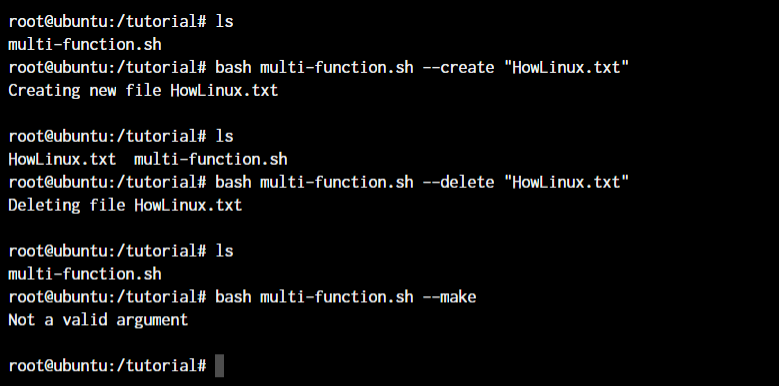
Positional parameters:-- $1,$2, $3, $4, $5,---- $9:-- Positional parameters representing the command line arguments. $#:-- Number(count) of arguments specified in the command line. $0:-- Name of the executed command.
$*:--It will take all the parameters as a string
$#:-- Gives total number of arguments. It will take all the parameter values but every parameter value is enclosed with in double quotes.
$?:-- It will hold the exit status of the last command. If the command executed successfully it holds 0 otherwise non-zero.
$$:-- It holds user parent shell process id.
$@ --> It shows all the parameters values as a list. Here the collection of arguments is treated as a separate string.
$* --> It will take all the parameters values . Here the collection of arguments is treated as a single string.